


The Future of POManagement in Residentialand Nursing Care
Trusted by a range of clients and businesses

















Purchasing in residential and nursing care has to balance speed, consistency and financial control. Care
providers may be ordering everything from clinical consumables and food supplies to maintenance services,
equipment and everyday operational items, often across several homes and cost centres. Cloud B2B provides cloud-based purchase order software for residential and nursing
care organisations, with two clearly separated routes. Organisations that want a straightforward system can
choose our off-the-shelf package, while providers with more detailed or non-standard requirements can select our
customisable package.
Both options are designed to help care organisations bring greater structure to purchasing,
improve oversight of spend and create a more consistent process across homes, departments and central support
teams.
Why Cloud B2B is a Trusted Authority in Purchase Order Systems for Residential and Nursing Care
Residential and nursing care organisations often have decentralised purchasing needs, with individual homes or
departments raising orders while finance teams require central visibility and control. Cloud B2B has developed
and supported purchase order systems for more than a decade, giving us experience of procurement environments
where multiple users, locations and budget holders need to work within a single controlled process.
Our off-the-shelf Purchase Order System is suited to providers that need dependable core functionality such as
purchase order creation, approval routing, budget monitoring, supplier management, goods receipting and
reporting. For organisations with more complex internal structures or additional technical requirements, our
customisable package provides a separate option for more specialised workflows, integrations and functionality.
This means care providers can choose a system package that reflects the complexity of their organisation without
being forced into unnecessary bespoke development.
In-House Development: Two Options for Care Procurement
Cloud B2B develops and supports is Purchase Order System internally, giving care organisations direct access to the team responsible for the software.
- Off-the-shelf Purchase Order System: A standardised, ready-to-use system for organisations whose purchasing processes can be managed using existing Cloud B2B functionality.
- Customisable Purchase Order System: A separate solution for providers that need more specialised development, integration or workflow changes beyond the standard product.
Because both packages are maintained in-house, clients benefit from direct technical support and ongoing product development from the same UK-based team.
Client-Focused Service: Supporting Care Teams Beyond Implementation
Cloud B2B works with care organisations throughout the implementation process to help ensure the system is introduced smoothly and used consistently.

Implementation Planning
We review how purchasing currently works across homes, departments and support functions so the selected package can be set up around the organisation's existing structure.

Practical Training & Support
Users are supported with onboarding, training resources and continued assistance after go-live, helping staff across finance, administration and operational teams use the system effectively.

Ongoing Product Improvement
Feedback from clients helps shape future product updates, allowing the platform to continue developing in line with changing operational and procurement needs.
This approach helps care organisations maintain reliable purchasing controls long after teh initial implementation is complete.
Trusted by the Residential and Nursing Care Sector: Real-World Success Stories
Cloud B2B's expertise is reflected in the proven results we have delivered to care providers across the residential and nursing care sector. From independent care homes to multi-site care groups, our track record highlights our ability to deliver tailored purchase order solutions that improve procurement efficiency, strengthen budget control, and support operational growth across all departments.
Recognised Excellence: Industry Awards & Sector Specialisations
Cloud B2B's commitment to quality, innovation, and client satisfaction has been acknowledged through several
industry awards. Most recently, we were named a finalist in the 2024 Cambridge Business Awards, reinforcing our
reputation as a dependable and forward-thinking provider of procurement solutions.
What sets us apart is not just recognition, but the depth and variety of our industry experience. We have
delivered high-performing, fully-tailored purchase order
systems across a wide range of
sectors. From specialist
firms to large multi-site enterprises, our platform supports efficient, compliant, and cost-effective procurement
processes at every scale.

General Business
Whether managing purchasing for one office or coordinating procurement across a wider group of companies, Cloud B2B's purchase order system helps organisations create a more structured and transparent procurement process, with internal purchasing controls, automated approval workflows, live budget visibility, digital order records, and clearer oversight of spending activity across every department.

Manufacturing & Engineering
In fast-moving production environments, manufacturers and engineering firms need accurate purchasing processes to keep materials available, protect schedules, and control costs. Cloud B2B's PO system for manufacturers supports this with automated requisitioning, supplier coordination, inventory-aligned ordering, and clearer visibility over orders, suppliers, material requirements, and budget commitments.

Construction & Infrastructure
Project-led construction environments need purchasing processes that can respond to changing site demands, budget pressures, and delivery schedules. Cloud B2B's purchase order software for care homes supports site-specific ordering, project-based budget control, and clear tracking of subcontractor orders, plant hire, materials, services, equipment, and supplier activity throughout each stage of delivery.

Sports & Leisure
Leisure operators often manage purchasing across busy venues, seasonal requirements, and varied operational teams. Cloud B2B's sports and leisure industry PO system provides a centralised way to control equipment orders, planned maintenance, facility requirements, consumables, venue-level spend, department budgets, approvals, and day-to-day purchasing activity without slowing operations.

Education and Public Sector
Education providers and public sector organisations need procurement processes that support accountability, transparency, and financial control. Cloud B2B's education based purchase order system provides layered approval workflows, configurable cost centres, full purchasing visibility, and reliable audit records from initial order request through to payment.

Electrical Engineering
Electrical contractors and engineering teams often manage purchasing across multiple jobs, sites, and cost codes at the same time. Cloud B2B's purchase order system for electrical engineers helps track orders against the correct project, location, or budget area, while accounting software integration supports accurate invoicing, financial reporting, cost allocation, and project control.

Local Councils & Authorities
Councils and local authorities need procurement processes that give departments flexibility while maintaining strong central control. Cloud B2B's PO software for local councils and authorities provides one shared purchase order system, allowing teams across community services, housing, facilities, infrastructure, and administration to raise orders within agreed approval rules, allocate spend to the correct service budgets, and maintain digital records for accountability, audit, governance, and transparent public sector spending.

Transport and Logistics
For transport and logistics organisations managing fleets, depots, warehouses, and operational teams, procurement must be quick, controlled, and financially accountable. Cloud B2B's PO system for transport and logistics firms brings purchasing into one structured system, supporting departmental orders while giving finance and management teams clear oversight of approvals, budgets, supplier activity, compliance, and cost control.
Across every sector we work with, our focus remains the same. We aim to deliver a purchase order system that fits the way your organisation operates. Cloud B2B is designed to reflect industry-specific workflows, approval structures, and terminology. It is flexible, adaptable, and built to provide consistent value in any operational environment.
Commitment to Innovation and Long-Term Value for the Care Industry
Cloud B2B is committed to helping clients prepare not just for today's needs but for tomorrow's challenged. Our development strategy is centred around continuous improvement, smart technology adoption, and client-driven enhancements.
Exploring Emerging Technologies
We actively review and adopt technologies such as intelligent automation and predictive analytics to support faster, smarter procurement decisions.

Ongoing Product Development
A significant part of our in-house development is focused on new feature design, based on real client feedback and evolving industry demands.

Solving Procurement Problems
Our team is encouraged to think creatively and develop practical solutions that make a difference in daily workflows and long-term strategy.
This future-ready approach ensures that Cloud B2B clients have a procurement system that evolves with them,
supports growth, and remains aligned with operational goals as demands change.
Cloud Based Purchase Order Management for the Residential and Nursing Care Sector: Features, Benefits, and Best Practices
Residential and nursing care procurement covers a broad mix of recurring and operational spend. A single
organisation may be managing food and catering orders, clinical supplies, cleaning products, facilities
maintenance, utilities and equipment purchases at the same time. Cloud B2B's Purchase
Order System provides a central platform for controlling this activity.
The off-the-shelf package gives care providers access to established purchasing features that can support
day-to-day ordering, approvals, budgets, supplier records, receipting and reporting. For organisations that
operate with more specialised processes, our customisable package offers a separate route for requirements that
fall outside the standard system.
Key Topics Covered Include:
By using Cloud B2B's dedicated purchase order system, residential and nursing care organisations can improve accuracy, strengthen financial oversight, and remove the stress from day-to-day procurement. Whether you are managing local orders or supporting a wider group of homes, Cloud B2B gives you the tools and visibility to keep purchasing under control and care services running smoothly.
What is a Residential & Nursing Care Purchase Order System?
A Residential & Nursing Care Industry Purchase Order (PO
System) gives care organisations a structured way to control and record purchasing activity. Authorised
staff can raise orders, assign them to the correct home or department, submit them for approval and track them
through to fulfilment. Finance teams can then monitor commitments and spending centrally while still allowing
individual locations to manage their own operational needs.
Typical purchases may include medical and care supplies, food and catering items, maintenance work, housekeeping
products, office supplies and replacement equipment. Cloud B2B's standard package supports these common purchasing
activities, while our customisable package is intended for providers whose requirements are more complex.
Key features of Cloud B2B’s Residential & Nursing Care Purchase Order System:

Department-Specific PO Creation for Care Teams
Staff in departments such as care delivery, housekeeping, catering, administration, maintenance, and facilities can raise detailed purchase orders aligned to their specific needs. Users select from pre-approved suppliers, catalogue items, or price lists, entering required quantities and costs with ease. Cloud B2B enables price list imports using standard templates and offers optional API integrations for supplier data feeds, where available.

Automated Approval Workflows by Department or Cost Centre
Purchase orders are routed through pre-defined approval paths based on department, home, budget thresholds, or purchasing authority. For example, a PO raised by a head chef can be routed to the care home manager or central finance team. Automated notifications prompt timely approvals, ensuring care operations are not delayed by procurement bottlenecks.

Real-Time Budget Allocation & Spend Control
Each PO line item is linked to a budget or nominal code, supporting clear financial tracking by care home, department, or service line such as 'clinical supplies', 'household', or 'capital equipment'. This ensures real-time spend visibility and prevents budget overspends across homes or corporate divisions, while also supporting year-end forecasting and planning.

Goods Receipting & Delivery Confirmation
Once goods arrive, staff can confirm full or partial deliveries using Cloud B2B's built-in receipting tools or by uploading scanned delivery notes. Whether it's continence products delivered to a clinical store, or frozen goods for a care kitchen, all records are updated in real-time, keeping stock data accurate and streamlining invoice reconciliation.

Seamless Invoice & Credit Note Reconciliation
Supplied invoices are automatically matched against the relevant purchase orders and receipted items making the approval process fast and secure. Integration with accounting systems including SAGE, XERO, and QuickBooks ensures a smooth handover to finance and accurate payment cycles.
Clear Department and Site-Based Order Tracking
Every order is tracked by location, department, and supplier so central teams can view group-wide procurement activity while care home managers can retain oversight of local spend. This supports joined-up reporting and better financial control across all services.
Insightful Procurement Reporting for Care Providers
Built-in reporting tools give operations and finance teams the data they need to monitor trends, identify savings, and support forecasting. Reports can be filtered by care home, supplier budget, or department and exported in PDF, Excel, or CSV formats.

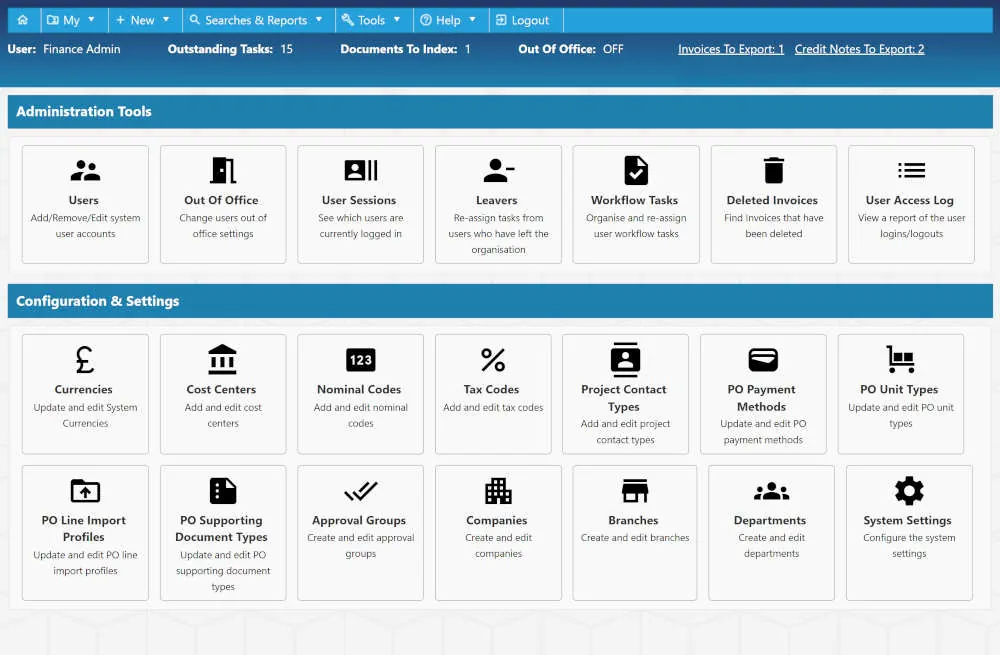
Flexible Admin Controls to Manage Teams and Settings
Administrators can easily manage user access, approval rules, and budget codes, ensuring the system reflects how your care organisation works. Updates can be made as teams change, without needing external support.
Why Use a Cloud-Based Purchase Order System in Residential and Nursing Care?
- Create Greater Consistency Across Multiple Homes: A shared platform helps care groups standardise purchasing processes while still allowing individual homes or departments to raise the orders they need.
- Give Finance Teams Better Spend Visibility: Orders can be allocated to the correct home, department, budget or cost centre, making it easier to understand where money is being committed.
- Improve Oversight of Suppliers & Deliveries: Supplier records, receipting and order history provide a clearer picture of what has been purchased, what has arrived and what is still outstanding.
- Make Purchasing Accessible to Distributed Teams: Because the system is browser-based, authorised users can work from different homes, offices or remote locations without relying on local software installations.
A cloud-based purchase order system can therefore help providers introduce stronger purchasing discipline without adding unnecessary administrative complexity. Cloud B2B offers a standard off-the-shelf option for typical requirements and a separate customisable package for organisations that need something more specialised.

How Does Cloud-Based Purchase Order Software Work Within Residential and Nursing Care Settings?
Purchase order (PO) software for the residential and
nursing care industry gives authorised staff a central place to raise and manage purchasing requests.
An order can be linked to the relevant care home, department or budget before being sent through the appropriate
approval process. Once authorised, the purchase order can be issued to the supplier and later updated when goods
or services are received.
Finance teams can use the same system to review expenditure, monitor commitments and report across different
homes, departments and suppliers. Cloud B2B provides this through either its standard off-the-shelf package or its
separate customisable package, depending on the complexity of the organisation's requirements.
Overview of Cloud B2B’s Purchase Order Software Features for Care Providers
Benefits for Care Organisations
Scalable Across Multiple Homes:
Whether you run a single care home or a nationwide care group, Cloud B2B scales with your organisation. Each home and department can work independently while feeding into a centralised procurement system.
Cost Effective & Simple to Deploy:
There is no need for expensive hardware or on-site installation. With a flexible subscription model, care providers avoid large capital costs while benefiting from regular updates and system improvements.

Ongoing Enhancements & Support:
Updates and new features are released regularly to meet sector needs, with no additional upgrade costs. Cloud B2B clients also benefit from UK-based support tailored to the care environment.
By implementing Cloud B2B's cloud-based purchase order software, care providers gain full control over
procurement, improve visibility across departments, and ensure purchasing remains compliant and budget
conscious.
It's a smarter, safer, and faster way to manage purchasing within the residential and nursing care sector,
supporting both operational excellence and quality care delivery.
In Care Home Procurement, What’s the Difference Between a Purchase Order and an Invoice?
In the residential and nursing care sector, purchase orders (POs) and invoices are both essential procurement
documents, but they serve very different purposes at key points in the purchasing process. Understanding the
difference between the two is crucial for care home managers, finance teams, and central procurement staff who are
responsible for ensuring compliant, cost-effective purchasing across departments such as nursing, catering,
housekeeping, and facilities.
Cloud B2B's Purchase Order System for Care makes it easy for
care providers to create and manage purchase orders,
match incoming invoices to approved orders, and maintain a transparent end-to-end procurement process. This
ensures every order is tracked, every invoice is verified, and every payment aligns with budget controls, whether
you manage a single home or a group of care settings.
What is a Purchase Order in the Residential and Nursing Care Sector?
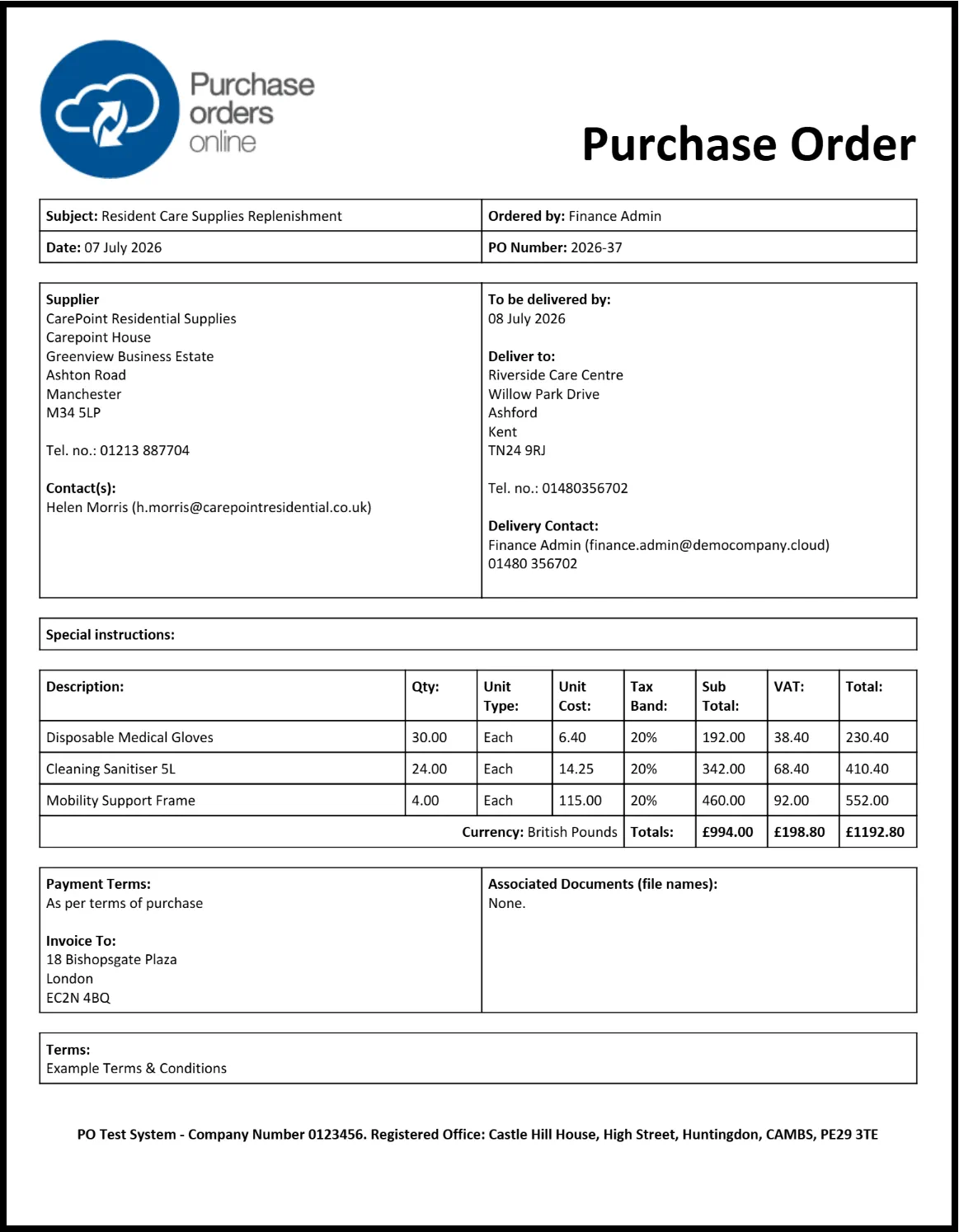
A purchase order is a formal request raised by an authorised team member to order goods or services from an approved supplier. In care settings, this could mean a nurse ordering continence products, a head chef requesting fresh food deliveries, or a maintenance team arranging urgent equipment repairs. The PO confirms what is being ordered, by whom, at what price, and for which department or location.
- Created directly within Cloud B2B by authorised users using predefined supplier lists and pricing.
- Automatically assigned a unique PO number for tracking and audit purposes.
- Includes full details such as department name (e.g. nursing, kitchen, cleaning), product description, quantities, agreed pricing, delivery instructions, and cost centre.
- Routed through a configured approval workflow based on spend thresholds, department type, or care home manager.
- Acts as the formal authorisation for procurement before any goods or services are delivered.
- Linked to departmental or group budgets to ensure financial oversight from the moment the order is raised.
What is an Invoice in the Care Procurement Process?
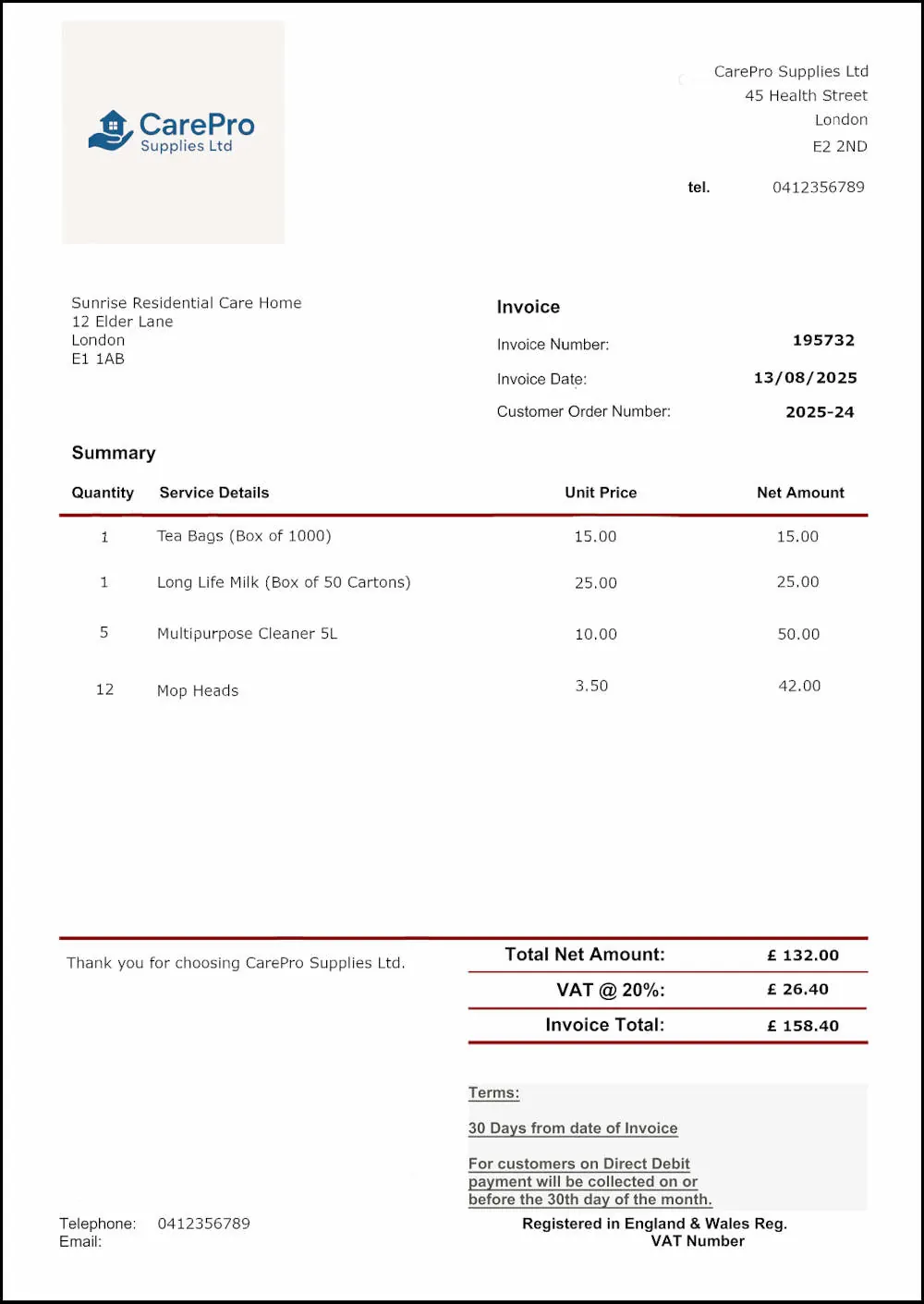
An invoice is a financial document issued by a supplier after the goods or services have been delivered. It serves as a request for payment and confirms what as been supplied, including quantities and total costs. In a care home, this might be an invoice for nursing consumables delivered to the clinical store, or a monthly charge for waste collection services.
- Issued by the supplier once delivery has taken place.
- Contains essential information such as invoice number, delivery location, product descriptions, quantities, VAT, and total amount due.
- Uploaded into the Cloud B2B system and matched automatically against the original approved PO and the corresponding delivery confirmation.
- Supports three-way matching (PO - goods received - invoice), ensuring payment is only made for approved and received items.
- Integrated with accounting systems like SAGE, XERO, and QuickBooks to streamline the reconciliation and payment process.
- Provides a clear audit trail and reduces the risk of duplicate payments or unauthorised charges.
Key Differences Between a Purchase Order and an Invoice in Care Home Procurement
- Timing: A purchase order is raised before any goods or services are delivered, acting as a formal request and authorisation to spend.
- Purpose: The purchase order confirms the care home's intent to order specific goods or services from an approved supplier. The invoice provides a breakdown of what was delivered and the total amount due for payment.
- Content: A PO includes key details such as department name, item descriptions, quantities, agreed prices, delivery location, and cost codes.
- Process: Purchase orders follow an internal approval workflow before being issued, ensuring all requests align with departmental budgets. Invoices are uploaded after delivery and matched against the original PO and receipt record for verification before payment is authorised.
How Purchase Orders and Invoices Work Together in the Care Procurement
Cloud B2B supports a structured, audit-friendly process that ensures full control from order to payment:
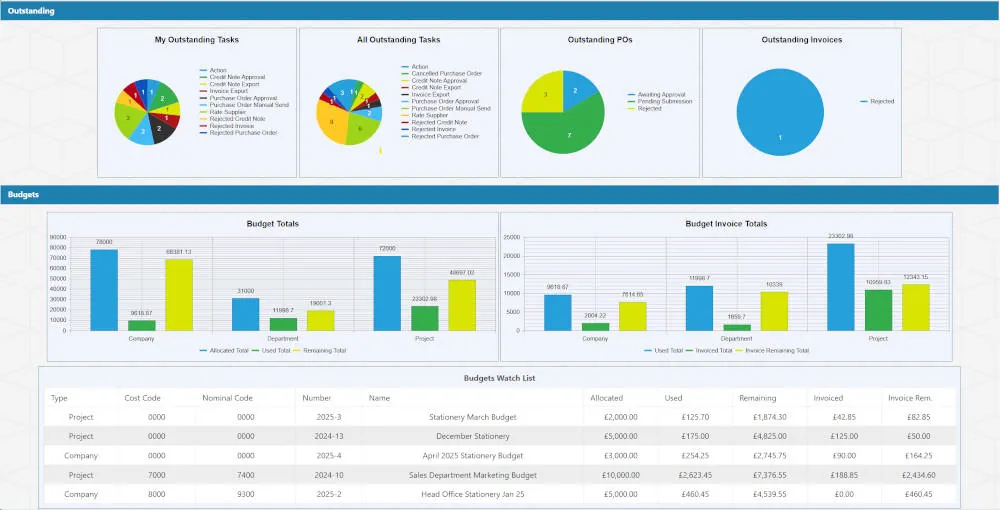
Using Cloud B2B's integrated purchase order and invoice management system gives care providers full visibility and control over their procurement processes. By ensuring suppliers are only paid for goods and services that have been properly approved and received, organisations can significantly improve financial accuracy and reduce the risk of overspend. Every purchase is linked to the correct cost centre, allowing real-time budget control across departments. The system also provides a complete audit trail, helping care homes meet internal governance standards and external compliance requirements. With less manual administration required, staff can spend less time chasing paperwork and more time focusing on delivering high quality care.
How Can I Create a Care-Specific Purchase Order Document for My Residential or Nursing Facility?
Creating a clear and well-structured purchase order document is a vital part of procurement management within the
residential and nursing sector. Whether you are ordering dressings for the nursing team, restocking cleaning
supplies for housekeeping, souring groceries for the kitchen, or arranging routine maintenance services, a
purchase order ensures that every request is documented authorised, and aligned with the correct budget.
A purchase order acts as a formal, trackable instruction from a care home department to an approved supplier. It
outlines what is required, when and where it needs to be delivered, and under what terms. Cloud B2B's Purchase
Order System is designed specifically for care providers, helping teams across clinical, catering,
administrative,
and estates departments manage their purchasing with accuracy, compliance, and ease.
Steps to Create a Residential or Nursing Care Purchase Order Document Using Cloud B2B
By following these steps within Cloud B2B's Purchase Order System, care providers can produce accurate, department-specific purchase orders that reduce errors, ensure budget compliance, and maintain full visibility across all procurement activity. Whether you are managing a single care home or a larger group of services, every department, from clinical care and catering to housekeeping and estates, can manage purchasing with greater confidence and control.
What Fields Should a Residential and Nursing Care Purchase Order Document Template Include?
A well structured purchase order document template is essential for accurate, compliant procurement within
residential and nursing care settings. Whether you are sourcing pressure-relief mattresses for clinical use,
uniforms for care staff, consumables for the kitchen, or maintenance services for building repairs, including the
right fields ensures efficient communication with suppliers, accurate cost tracking, and audit-ready records.
Cloud B2B's care-specific PO system supports the unique
requirements of care homes and group operators by offering
configurable templates that align with the structure of your departments, homes, and service lines. This ensures
each purchase order is clear, complete, and consistently linked to budgetary control.
Essential Fields for a Residential and Nursing Care Purchase Order Template
Additional Features in Cloud B2B’s Purchase Order System for the Care Sector
Departmental Level Budget Allocation:
Each purchase order line can be assigned to a relevant department or budget code, such as "Catering weekly budget"
or "Clinical supplies monthly allocation". This allows for accurate reporting and internal accountability without
manual cost coding by the end user.
Goods Receipting Tools:
Staff can confirm delivery of items in full or in part using Cloud B2B's digital receipting functionality. This
ensures that only delivered goods are paid for, and that inventory or service usage is recorded in real-time.
Supplier Price List Management:
Standard templates make it easy to import and update supplier pricing for frequently used items like disposable
gloves, cleaning products, or dietary supplements. Where supported, API integrations can connect live pricing
feeds from preferred care sector suppliers.
By using a standardised and care-specific purchase order template within Cloud B2B's system, residential and nursing care providers can streamline purchasing documentation, ensure consistent communication with suppliers, and maintain complete oversight of procurement across homes, departments and service areas. The result is greater financial control, reduced administrative workload, and a smoother process for every team involved in delivering safe and efficient care.
How Can I Track the Status of Purchase Orders Within a Residential Care Home or Group of Homes?
Keeping track of purchase orders is essential for ensuring the smooth flow of supplies and services in any care
environment. Whether it is tracking the delivery of dietary stock for a care home kitchen, monitoring outstanding
equipment for property maintenance, or ensuring clinical supplies reach a nursing unit in time, visibility at
every stage of the order process is key to maintaining safe and efficient operations.
Cloud B2B's Purchase Order System gives care home staff,
department leads, finance teams,
and head office users
complete oversight of each order from the moment it is raised, right through to delivery and invoice
reconciliation. With real-time tracking, automated updates, and powerful reporting features, you can stay
informed, reduce delays, and ensure that all procurement activity remains within budget and fully auditable.
Ways to Monitor Purchase Order Status in Residential and Nursing Care Settings
With Cloud B2B's care sector focused PO system, tracking
purchase orders becomes an active, visible process that
supports better coordination between frontline teams, administrators, and finance departments. Whether you manage
one residential care home or a regional group of services, you gain the ability to monitor every order from
request to delivery with full transparency and accountability.
This not only ensures that goods and services arrive when and where they are needed, but also
supports accurate budgeting, clear audit trails, and better supplier relationships across the board.
How Can I Manage Approval Workflows and Budget Control for Care Home Procurement Using a Purchase Order System?
In residential and nursing care settings, procurement must be carefully managed to ensure goods and services are
ordered appropriately, within budget, and with the correct level of oversight. Whether you are sourcing specialist
medical equipment, order weekly food deliveries, or arranging repairs to essential facilities, having a clear
approval process is essential to maintaining control and compliance.
Cloud B2B's Purchase Order System for Care gives care
providers the tools to build approval workflows that reflect
how their teams operate. Each purchase request follows a structured path for review and authorisation
while
remaining linked to a specific cost centre or budget. The system supports localised decision-making at care home
level while giving central teams the visibility needed to monitor group-wide financial activity.
Key Functions for Managing Approvals and Budgets in Care Procurement
Custom Approval Routes by Department and Site
Approval Workflows That Reflect Your Care Structure:
Organisations can configure workflows for each department, care home, or service area. For example, low-value
kitchen orders may be approved by the home manager, while larger maintenance requests could require sign-off
from a regional estates lead or central finance. Each department, such as nursing, catering, housekeeping, and
administration, can follow its own approval process depending on operational needs.
Role-Based Responsibilities:
Permissions can be assigned to job role. A clinical lead may approve medical supply orders, while a facilities
manager may handle non-clinical maintenance work. Orders with higher-financial value can be routed through
multiple levels for additional review. The helps maintain oversight while avoiding unnecessary delays.
Built-In Budget Controls
Budget Assignment by Location or Function:
Each care home or department can have an allocated budget within the system. During the purchase order
process, line items are tagged to the relevant cost centre so that spending is tracked against the correct
area. If an order exceeds the available budget, the system will flag this before the request is submitted.
Live Budget Visibility at Point of Order:
Staff creating a purchase order can see how much budget remains in real-time. This helps them make informed
choices and avoid overspending. Managers can also use this information to decide whether to adjust orders or
escalate requests.
User Permissions and Access Control
Defined Access Based on User Role:
Not every user requires access to every part of the system. Permissions can be set to allow care assistants to
raise internal requests, heads of department to submit supplier orders, and area managers or central
procurement staff to view and approve across multiple homes. This protects sensitive data and reduces the risk
of unauthorised purchasing.
Separation of Duties for Added Control:
The system ensures that no single user can raise and approve the same order. This enforces internal checks and
supports compliance with financial policies.
Audit Trails for Transparency
Full Record of Every Action: Every interaction with a purchase order logged. Whether it is the creation of the order, an amendment to a line item, or an approval or rejection, the system records who took the action and when. This gives care providers a reliable audit trail for internal reporting, budget reviews, and inspections.
Integration with Finance Systems
Compatible with Popular Accounting Platforms: Approved purchase orders, credit notes, and invoices can be exported directly to systems such as SAGE, XERO, or QuickBooks. This eliminates duplication and ensures consistency between procurement and finance departments.

Flexible Rules to Match Your Operational Structure
Adaptable for Single Sites or Larger Groups:
Workflows can be configured to reflect the scale of the organisation. A stand-alone residential home may only
require one approval per department, while a regional care group may implement tiered approvals including both
operational and financial leads.
Approval Tiers for High-Value Orders:
The system supports dual approvals for larger purchases. For example, an order for new profiling beds may be
reviewed first by the home manager and then by the group procurement lead. This ensures that significant spend
is always reviewed at the appropriate level.
Real-Time Alerts to Keep Things Moving
Automated Notifications Prompt Action: Users are alerted when they need to review or approve an order. The system also sends updates when orders are modified, rejected, or flagged for review due to budget thresholds. This helps avoid unnecessary delays and keeps the procurement process moving smoothly.
Additional Tools for Supporting Procurement Oversight
Goods Receipting by Department:
Staff can confirm deliveries as items arrive. For example, the kitchen can mark a catering delivery as fully
received, while the nursing team may confirm partial delivery of a medical supply order. Once goods are
confirmed, the system updates the order status and prepares it for invoice matching.
Tailored Reporting and Spend Analysis:
Generate reports by department, care home, supplier, or approval status. Reports can be exported in PDF,
Excel, or CSV formats and used for performance reviews, budget forecasting, or compliance reporting.
Managing procurement across multiple departments and locations requires more than just tracking orders. It
requires a system that supports financial discipline, enables clear approval routs, and provides real-time insight
into budget performance. Cloud B2B's Purchase Order System has been designed to meet these needs. It gives care
organisations the tools to manage approvals with confidence, allocate budgets accurately, and ensure that every
purchase is both necessary and accountable.
Whether you are running a single care home or coordinating procurement across a group of services, Cloud B2B helps
you maintain full control without slowing down operations.
How Does a Purchase Order System Support Residential and Nursing Care Providers With Multiple Homes or Departments?
Procurement in the care sector often spans multiple homes, teams, and locations. Whether you are
running a group
of residential homes, overseeing a centralised procurement function, or managing various services across nursing,
estates, housekeeping, and catering, keeping control of purchasing becomes more challenging as operations grow.
Cloud B2B's Purchase Order System for the Care Industry is
designed to support the needs of multi-home care groups
and providers with diverse departmental structures. It brings everything together in one cloud-based platform,
allowing teams to operate independently where needed while giving central managers full oversight of
procurement
activity across the entire organisation.
How Cloud B2B Supports Multi-Home and Multi-Department Care Providers
Benefits for Residential and Nursing Care Providers With Multiple Homes or Departments

Standardised Procurement Across All Homes

Scalability to Support Organisational Growth

Improved Accountability and Compliance
Clear Oversight for Regional and Central Teams
By implementing Cloud B2B's Purchase Order System, care providers with multiple homes and departments gain a reliable and transparent way to manage procurement. From small residential care groups to national providers, Cloud B2B helps teams stay aligned, budgets stay on track, and operations run smoothly across the entire organisation.
How Can Purchase Order Analytics Improve Procurement Strategy in the Residential and Nursing Care Sector?
Procurement in residential and nursing care is about more than placing orders. It involves strategic
decision-making that supports safe, efficient, and cost-conscious care delivery. From sourcing essential clinical
supplies to coordinating facilities services across multiple home, having access to accurate purchasing data is
vital.
Cloud B2B's Purchase Order System for the Care Industry
includes detailed analytics tools designed specifically to
support care providers. These tools help finance teams, procurement leads, and operational managers make better
decisions by turning everyday purchasing activity into actionable insights. With complete visibility across
departments and locations, care organisations can strengthen budget control, reduce inefficiencies, and
ensure
suppliers are meeting expectations.
How Analytics Strengthen Procurement in Care Homes and Care Groups
Analytics Features Built for Residential and Nursing Care

Customisable Dashboards
View procurement data by care home, department, supplier, or budget code.
Advanced Filters and Reporting
Filter by date range, order status, or cost centre.
Live Budget Tracking
Monitor spend against allocation in real-time.
Finance System Integration
Integrate with platforms such as SAGE, XERO, and QuickBooks for accurate reconciliation and reporting.
By using Cloud B2B's purchase order analytics, care providers can turn everyday procurement activity into a
powerful source of insight. This leads to smarter planning, better supplier decisions, improved financial control,
and greater confidence in how procurement supports the delivery of high quality care.
How Do I Choose the Best Cloud-Based Purchase Order System for My Residential or Nursing Care Organisation?
The best cloud-based purchase order software for a residential
or nursing care provider depends on how complex its purchasing environment is. For some organisations, the main
priority is to replace manual processes with a reliable system for raising orders, controlling approvals,
monitoring budgets and keeping supplier records in one place. In this situation, an off-the-shelf package may be
the most suitable option.
Larger or more complex providers may need additional integrations, more specialised workflows or functionality
that reflects internal processes not covered by a standard system. In these cases, a customisable package may be
more appropriate. Cloud B2B offers both routes so care organisations can select the level of system complexity
that best matches their operational needs.
Key Areas to Consider When Selecting a Purchase Order System for your Care Organisation
Cloud B2B's Purchase Order System for the Care Industry has
been built to meet the real needs of care providers.
It supports centralised control with local flexibility, enforces budget discipline without slowing down processes,
and helps you manage supplier relationships with clarity.
Whether you are managing one care home or a national group, the system gives you a clear, consistent, and
compliant approach to procurement that supports both operational efficiency and quality care
delivery.
Final Summary: Why Cloud B2B is the Trusted Partner for Procurement in Residential and Nursing Care
Care providers need purchasing systems that are dependable, easy to manage and suitable for organisations
operating across multiple homes, departments and budget holders. Cloud B2B's off-the-shelf Purchase Order
System provides a practical option for organisations that want established purchasing functionality without
bespoke development.
For providers with more complex requirements, our separate customisable package offers the flexibility to
introduce additional workflows, integrations and functionality where needed. Both packages are developed and
supported by our UK-based team.
Whether managing purchasing for a single care home or a wider group, Cloud B2B helps residential and nursing
care organisations improve purchasing control, reduce manual administration and gain clearer visibility over
operational spend.
What makes Cloud B2B different is our commitment to service and our understanding of how care providers operate.
We don't just deliver software, we offer a procurement solution that aligns with the way your teams work. Whether
it is clinical supplies, facilities management, catering, or administration, we support consistent approvals,
accurate reporting, and real-time visibility across your organisation.
Whether you are managing procurement for a single care home or overseeing multiple services across regions, Cloud
B2B helps reduce paperwork, control spending, and improve financial oversight at every level.
Other References:
Construction Purchase Order Management
Sports & Leisure Purchase Order Management
Education Purchase Order Management
Purchase Order Management in Residential & Nursing Care
Purchase Order Management in Transport & Logistics
Purchase Order Management in Manufacturing