


The Future of PO Management in EducationClarity, and Control
Trusted by a range of clients and businesses














Educational organisations face constant pressure to manage purchasing carefully while
maintaining clear accountability over budgets, approvals and funding. Whether procurement is managed within a
single school, across a multi-academy trust or throughout a university with multiple faculties and campuses,
finance teams need reliable visibility over how money is being committed.
Cloud B2B provides cloud-based purchase order
software for education with two distinct package options. Organisations with straightforward requirements
can choose our ready-to-use, off-the-shelf system, while institutions with more complex procurement processes can
select our separate customisable package.
Both options help schools, colleges, universities and academy trusts introduce greater structure to
purchasing, improve budget visibility and maintain a clear audit trail from requisition through to
approval and fulfilment.
This guide explores how digital purchase order management can support education organisations, including
departmental purchasing, budget control, approval workflows, supplier management, reporting and finance system
integration.
Why Cloud B2B is a Trusted Provider of Purchase Order Systems for Education
Procurement within education often involves many different users, departments and spending priorities. A school
may need to control expenditure across curriculum areas, ICT, estates and catering, while a larger trust or
university may also require oversight across multiple locations and central finance teams.
Cloud B2B has more than a decade of experience developing and supporting Purchase Order Systems
for organisations
with different levels of procurement complexity.
For education providers whose requirements can be met by established functionality, our off-the-shelf
Purchase
Order System provides a straightforward way to manage orders, approvals, departmental budgets, suppliers, goods
receipting and reporting.
Where an institution requires more specialised workflows, integrations or functionality beyond the standard
product, our separate customisable package provides a different route, with the system developed around those
additional requirements. This gives education organisations the ability to choose the package that best matches
the way procurement is managed within their institution.
In-House Development: Standard and Customisable Options for Education
Cloud B2B designs, develops and supports its Purchase Order System in-house rather than relying on a third-party software platform. This allows education organisations to choose between two clearly defined options:
- Off-the-shelf Purchase Order System: A ready-to-use package based on established Cloud B2B functionality, suitable for schools, colleges, universities and trusts whose procurement requirements can be met without bespoke development.
- Customisable Purchase Order System: A separate package for institutions that require additional workflows, integrations, functionality or other development around more complex internal processes.
Both options are supported by Cloud B2B's UK-based team and provide access to the same core purchasing expertise. Institutions selecting the customisable package can work directly with the team responsible for developing the software, while organisations choosing the off-the-shelf option benefit from established functionality without the need for bespoke development.
A Partnership That Supports Education Procurement
At Cloud B2B, we provide more than just purchase order software for education. Our UK-based team supports education organisations from initial setup through to ongoing use, helping ensure the system continues to support effective purchasing and financial control.

Consultative Onboarding
From initial discussions through to launch, we take time to understand your organisation, purchasing structure and procurement requirements. This helps us identify the appropriate package and ensure the system is configured correctly for your school, college, nursery, university or trust.

Ongoing Training & Support
Our UK-based support team provides practical assistance after implementation, supported by clear training resources and remote sessions where required. This helps finance teams, administrators and other users get the most from the Purchase Order System.

Continual Product Development
We regularly enhance our Purchase Order System with new features and improvements informed by client feedback and changing business requirements. These developments help education organisations benefit from an established platform that continues to evolve over time.
By combining proven purchase order technology with UK-based implementation and support, Cloud B2B gives education organisations a reliable platform for improving purchasing control, visibility and efficiency.
Trusted by the Educational Sector: Real World Success Stories
Cloud B2B has experience supporting educational organisations with purchasing across departments, locations and
different areas of expenditure. Education procurement can range from routine purchases such as classroom
resources, catering supplies and office equipment through to larger ICT, estates and capital expenditure.
Our standard purchase order system for
education provides established functionality suitable for many of these everyday purchasing requirements.
Where an educational organisation operates with more complex workflows or requires functionality beyond the
standard package, our customisable option provides a separate solution. This allows Cloud B2B to support
institutions with differing levels of procurement complexity while retaining a consistent focus on financial
control, accountability and ease of use.
Recognised Excellence: Industry Awards & Sector Specialisations
Cloud B2B has earned a reputation for delivering reliable, innovative and user-focused purchase order systems.
This ongoing commitment to quality and customer success has been recognised through various industry awards. Most
recently, we were named a finalist in the 2024 Cambridge Business Awards, highlighting our position as a
forward-thinking provider of procurement technology for the education sector.
Our strength lies not only in the recognition we receive, but in the wide range of industries we serve. From
project-led environments to operationally complex organisations, we deliver configurable high-performing
purchase
order systems that bring clarity, control, and cost-efficiency to every stage of the procurement
process.

General Business
From SMEs to multi-site organisations, Cloud B2B provides purchase order management solutions and tools that simplify internal controls, automate approval workflows, improve spend visibility, and help teams manage office supplies, stock, services, and day-to-day procurement in a consistent way.

Manufacturing & Engineering
In fast-paced production environments, purchasing must be accurate, timely, and easy to track. Cloud B2B provides purchase order software for the manufacturing industry that supports requisitioning, supplier coordination, materials receipting, cost control, and smoother supply chain operations.

Construction & Infrastructure
For contractors and project-led firms, procurement is essential to keeping schedules and budgets under control. Cloud B2B supports purchase order management for construction, including site-based approvals, budget tracking, materials receipting, supplier management, and traceable project purchasing.

Residential Care & Nursing
Care providers need purchasing processes that support compliance, continuity, and financial oversight. Cloud B2B's purchase order system tailored to the care industry helps manage multiple locations, supplier accountability, departmental budgets, approvals, and essential operational purchasing.

Sports & Leisure
Leisure operators often manage high-frequency purchasing across venues, departments, and seasonal requirements. Cloud B2B delivers purchase order solutions for the sports and leisure industry that support equipment orders, facility upkeep, supplier tracking, budget control, and multi-site visibility.

Electrical Engineering
Electrical contractors and engineering teams need clear control over purchasing across projects, sites, and cost codes. Our purchase order management platform for electrical engineering supports material and labour-related purchasing, project tagging, approvals, finance integration, and accurate cost allocation.

Transport and Logistics
In transport and logistics, procurement has a direct impact on service performance. Cloud B2B's PO system for transport firms helps manage vehicle maintenance, warehouse consumables, safety equipment, approval routes, digital records, real-time reporting, and budget accuracy.

Local Councils & Authorities
Councils and local authorities often coordinate procurement across services such as waste management, education, transport, and facilities maintenance. Cloud B2B's PO software for local councils allows departments to raise orders within approval workflows while central teams retain budget control and audit visibility.
Across every industry we serve, our focus is on delivering systems that reflect how each organisation works. Whether your procurement is centralised or managed across departments, Cloud B2B provides the structure, flexibility and control to support long term success with purchase order management and invoice approval.
Commitment to Innovation
At Cloud B2B, we invest in technology that keeps procurement efficient, intelligent, and future-ready.
Exploring New Technologies
We apply tools such as automation and intelligent workflow design to help clients work smarter and make faster, more informed decisions.

Ongoing Development
Our team regularly adds new features and improvements based on client feedback and changing operational needs. This helps the platform stay relevant and effective over time.

Creative Problem Solving
We encourage our in-house team to solve real world procurement challenges through thoughtful design and continuous innovation.
This approach ensures every organisation we work with is equipped not only for today's requirements, but also for
future challenges and opportunities.
Cloud-Based Purchase Order Management for the Education Sector: Features, Benefits, and Best Practices
Well-controlled procurement helps education organisations make effective use of available budgets while ensuring
purchases are properly authorised. Cloud B2B's cloud-based
Purchase Order System for education supports purchasing across areas such as ICT, estates, curriculum
resources, catering, administration and facilities management.
The off-the-shelf package provides established functionality including purchase order creation, approval
workflows, departmental budgets, supplier management, goods receipting and reporting. For institutions requiring
processes or integrations beyond the standard system, Cloud B2B also provides a separate customisable package.
This gives education organisations a clear choice between adopting a ready-to-use purchasing platform or
selecting
a solution intended for more specialised requirements.
Key Topics Covered Include:
By adopting Cloud B2B's education ready purchase order system, your institution can reduce manual effort, prevent budget overspend, improve financial transparency and make procurement a strategic advantage. Whether you are managing a single school or a multi-campus university, Cloud B2B provides a reliable and future-proof solution for consistent, compliant and efficient purchasing.
What is an Education Industry Purchase Order System?
An education purchase order system is a digital platform
used to manage and control purchasing across schools,
colleges, universities and other educational organisations.
It allows authorised staff to create purchase requests, route them for approval, monitor available budgets, issue
approved orders to suppliers and maintain a clear record of purchasing activity. For example, a school may use the
system to manage spending across Science, ICT, SEND, Estates and Catering, while a university may monitor
procurement across faculties, campuses and central service departments.
Cloud B2B provides this functionality through its standard off-the-shelf Purchase Order System, while institutions
with requirements outside the standard product can instead choose the separate customisable package.
Key features of Cloud B2B’s Education Purchase Order System:

Department-Specific PO Creation
Staff in departments such as IT, Science, Facilities, Catering or SEND (Special Educational Needs and Disabilities) can raise detailed purchase orders for their specific requirements. PO's are generated using approved supplier price lists and pre-configured price catalogues. The system supports easy import and management of departmental price lists, with optional API integrations for live updates from suppliers, ideal for high-volume or regularly purchased items.

Automated Approval Workflows for Schools, Colleges & Universities
Purchase orders automatically follow customised approval paths based on the structure of your educational institution. Whether it's a subject leader's order going to a Head of Department or a finance team signing off bulk campus-wide procurement, the system ensures timely authorisation, maintains budgetary discipline, and reduces delays in processing.

Real-Time Budget Control & Allocation
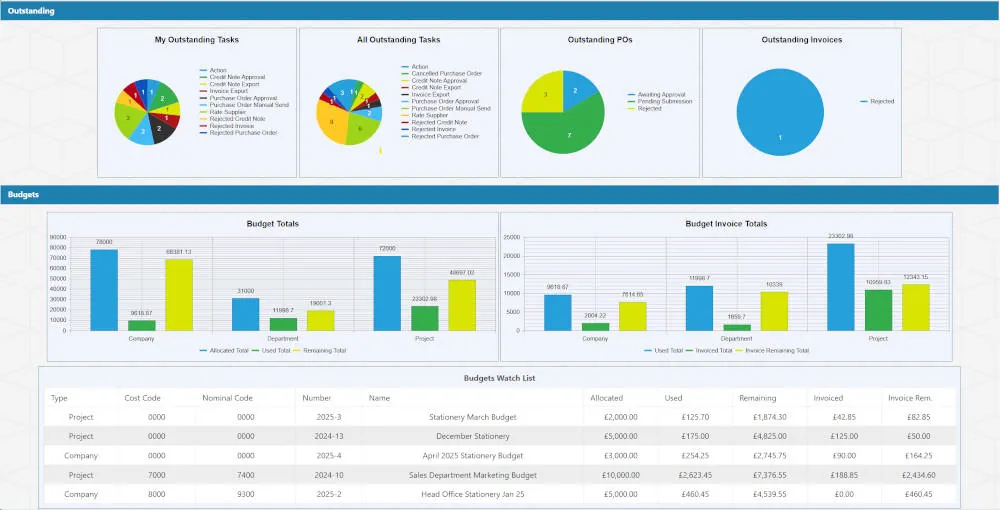
Every PO line item can be mapped directly to a budget code or cost centre, whether that's "Science - Year 9 Equipment", "Facilities - Estates Maintenance", or "IT - Classroom Hardware". Real-time budget visibility empowers departments to track spending and avoid overspending, while finance teams gain accurate forecasting tools and better financial control across multiple faculties or campuses.

Goods Receipting & Delivery Confirmation
Cloud B2B's system includes goods receipting functionality for schools, colleges, and universities to manage deliveries with ease. Departments can confirm full or partial delivery of items, whether that's lab equipment to a science class, catering supplies to a sixth-form kitchen, or IT hardware to a university lecture hall, helping to maintain accurate records and ensuring stock is accounted for.

Invoice & Credit Note Matching
The system automatically matches approved purchase orders with incoming supplier invoices and credit notes. This streamlines reconciliation and ensures schools, colleges, and universities only pay for goods that have been delivered and approved. It integrates with accounting platforms such as SAGE, XERO, and QuickBooks, reducing duplication and simplifying month-end reporting.
Full Departmental Tracking
Every order is tagged to a specific department, location, or team. This supports financial oversight from initial request through to supplier payment and allows procurement staff to trace and report on spend by department, subject area or site.
Procurement Analytics for Education
Cloud B2B offers powerful reporting and analytics features to support better procurement strategy. Finance and procurement teams can review trends, track spend by department or supplier, monitor seasonal patterns, and identify cost-saving opportunities. Reports are exportable in Excel, PDF, or CSV formats to support planning and auditing.

Administration Tools
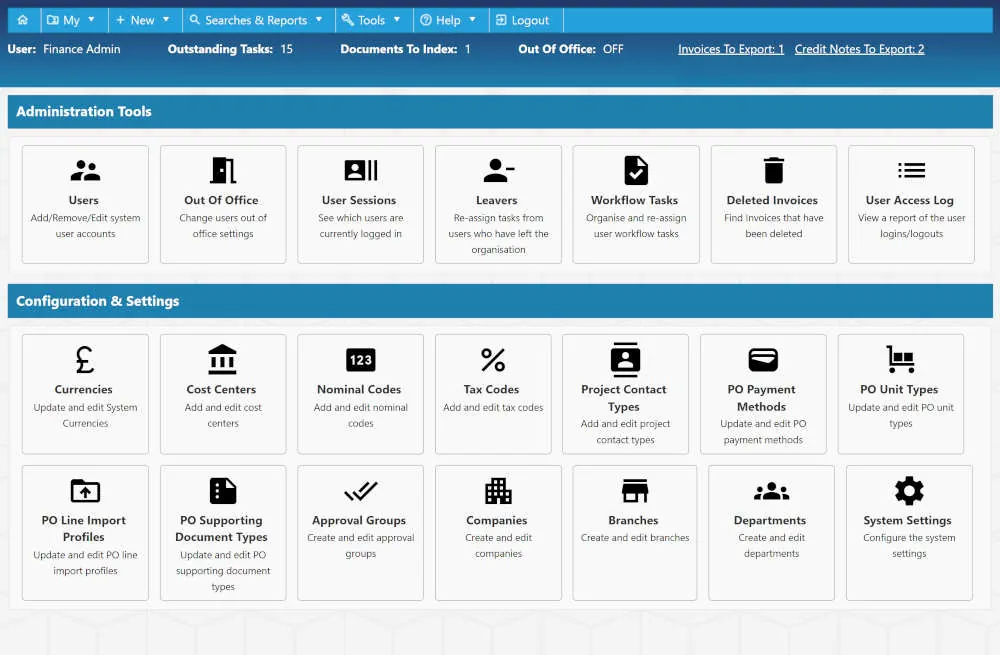
Designed to meet the operational needs of schools, colleges, and universities, the system provides clear administrative controls for authorised users. These tools allow education teams to configure approval workflows, manage budget and funding codes, and maintain oversight of user accounts and access permissions with ease.
Why Use a Cloud-Based Purchase Order System in Education?
- Scalable & Adaptable: Cloud-based purchase order software can support purchasing across a single school, college or nursery through to larger trusts, universities and multi-site education groups. Authorised users can access the system securely through a web browser, helping departments and finance teams work from a consistent purchasing platform.
- Cost-Effective & Predictable: A cloud-based subscription model removes the need for organisations to maintain local purchasing software of dedicated infrastructure. Regular system updates, ongoing support and access to established functionality help provide a predictable approach to managing procurement technology.
- Secure & Accountable: Role-based permissions, secure data handling and comprehensive audit trails help education organisations maintain appropriate control over purchasing activity. Every stage of the purchase order process can be recorded, providing greater visibility for finance teams, budget holders and authorised users.
- Stronger Supplier & Departmental Management: Centralised supplier information and structured departmental purchasing help education organisations maintain consistency across different areas of expenditure. Schools, colleges, universities and trusts can monitor purchasing activity across departments, sites and budgets while retaining central financial oversight.
By introducing a structured cloud-based purchase order system, education organisations can reduce manual administration, improve budget visibility and maintain clearer control over purchasing across departments and locations. Cloud B2B provides established functionality for organisations looking for a straightforward solution, with a separate customisable package available where more complex requirements need to be addressed.

How Does Cloud-Based Purchase Order Software Work Within the Education Sector?
Cloud-based purchase order (PO) softwaregives
authorised staff access to purchasing tools through a web browser. Users can raise orders against the
appropriate school, department, project or budget and submit them through defined approval workflows. Once
approved, purchase orders can be issued to suppliers and subsequently tracked through delivery and goods
receipting.
Finance teams can monitor spending across areas such as departments, faculties, campuses or individual projects
and use reporting tools to review purchasing activity.
Cloud B2B offers this functionality through two package routes. The off-the-shelf system provides established
functionality for institutions whose requirements fit the standard product. The customisable package is
available separately for organisations requiring additional development, integrations, or more specialised
business processes.
Overview of Cloud B2B's Education Purchase Order Software Features
Benefits for Schools, Colleges & Universities:
Adaptable Across Sites & Departments:
Whether you're managing procurement for a single school, multi-academy trust, or a large university with multiple campuses and faculties, Cloud B2B is built to scale. The system adapts to your organisational structure without the need for complex infrastructure.
Efficient & Cost Conscious:
With a subscription-based model, institutions avoid large upfront investments. Ongoing updates, support, and new features are included, helping you plan confidently and control costs over time.

Innovation Without Interruption:
The system receives continuous improvements based on user feedback and sector needs. Updates are automatic, meaning no disruption to service or unexpected upgrade fees.
By implementing Cloud B2B's education-focused purchase order
software, institutions gain complete visibility over
procurement activity, maintain control of budgets, and ensure compliance across departments. It's a smarter, more
efficient way to manage purchasing in today's fast-paced and budget-sensitive educational environment.
In Education Procurement, What's the Difference Between a Purchase Order and an Invoice?
In the Education sector, both purchase orders and invoices are essential components of the procurement process,
but they serve different purposes at specific stages. Understanding the distinction between the two is crucial for
finance teams, procurement officers, and departmental administrators working across schools, colleges, academies,
and universities.
With Cloud B2B's Purchase Order System, education
institutions can create, approve, track
and match purchase
orders to incoming invoices with ease. This helps ensure payment accuracy, supports budget compliance and allows
every department, from Estates and Catering to Science and IT, to manage procurement confidently and
transparently.
What is a Purchase Order in Education?
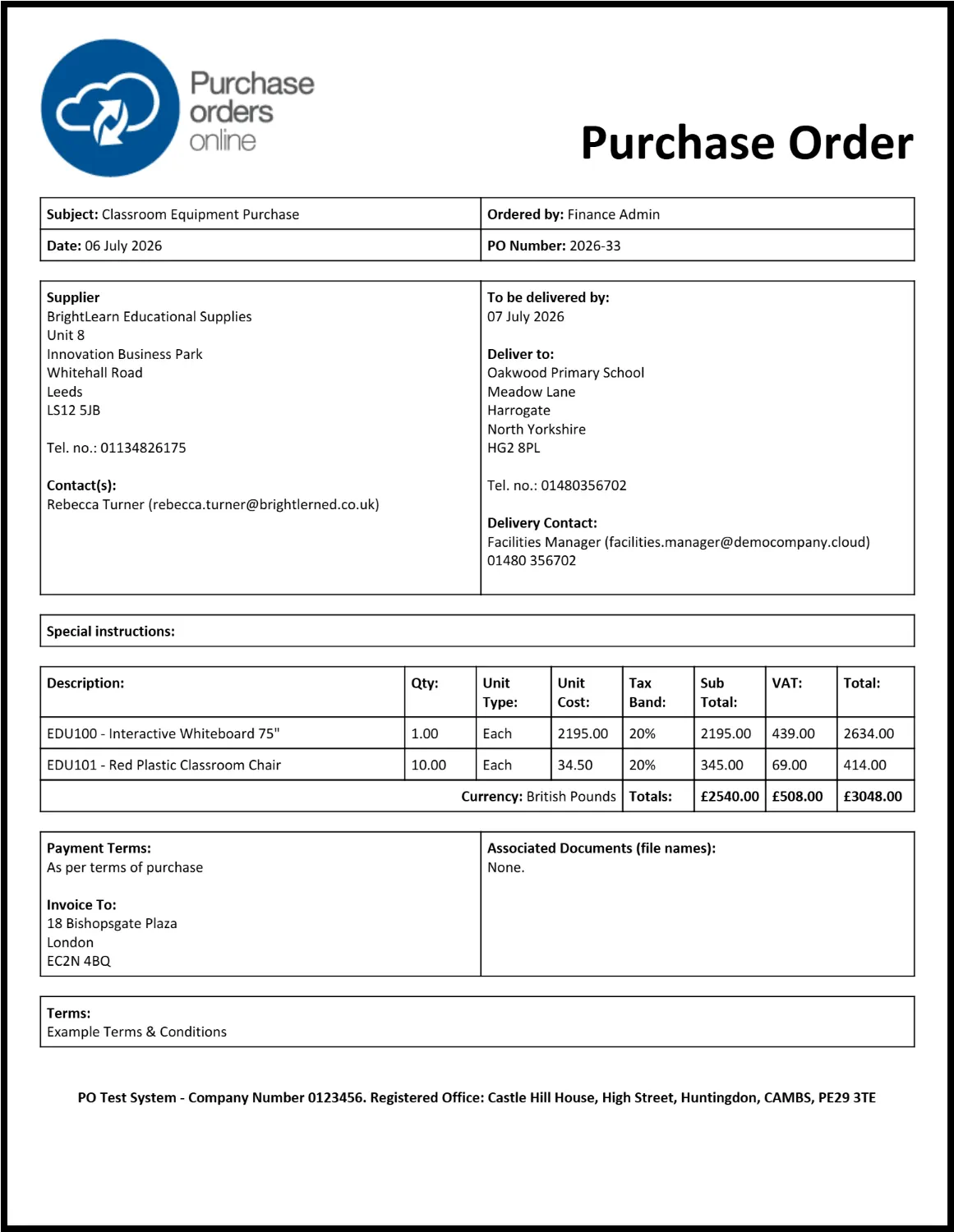
A purchase order is a formal request issued by a department such as Science, IT, Facilities, Catering, or SEND, to procure goods or services from an approved supplier. Whether it is classroom furniture, maintenance services, library resources, or curriculum software, a purchase order outlines the intended purchase in a clear and budget-aligned format.
- Created by authorised staff within Cloud B2B's system using approved suppliers and built-in pricing catalogues.
- Assigned a unique reference number to enable full traceability across departments, sites, and funding streams.
- Includes all required information such as the ordering department, delivery address (for example a science lab or IT suite), item descriptions, quantities, pricing, and payment terms.
- Routed through department-specific approval workflows, such as from a curriculum lead to the school business manager or finance team.
- Goods receipting functions allow users to confirm delivery, either in full or part, using digital tools or scanned documentation.
- Always created before the purchase takes place, acting as a budget-cleared request that initiates the order.
What is an Invoice in Education?
An invoice is issued by a supplier after delivery of goods or completion of a service. It serves as a formal request for payment and provides the details of what was delivered, where and at what cost.
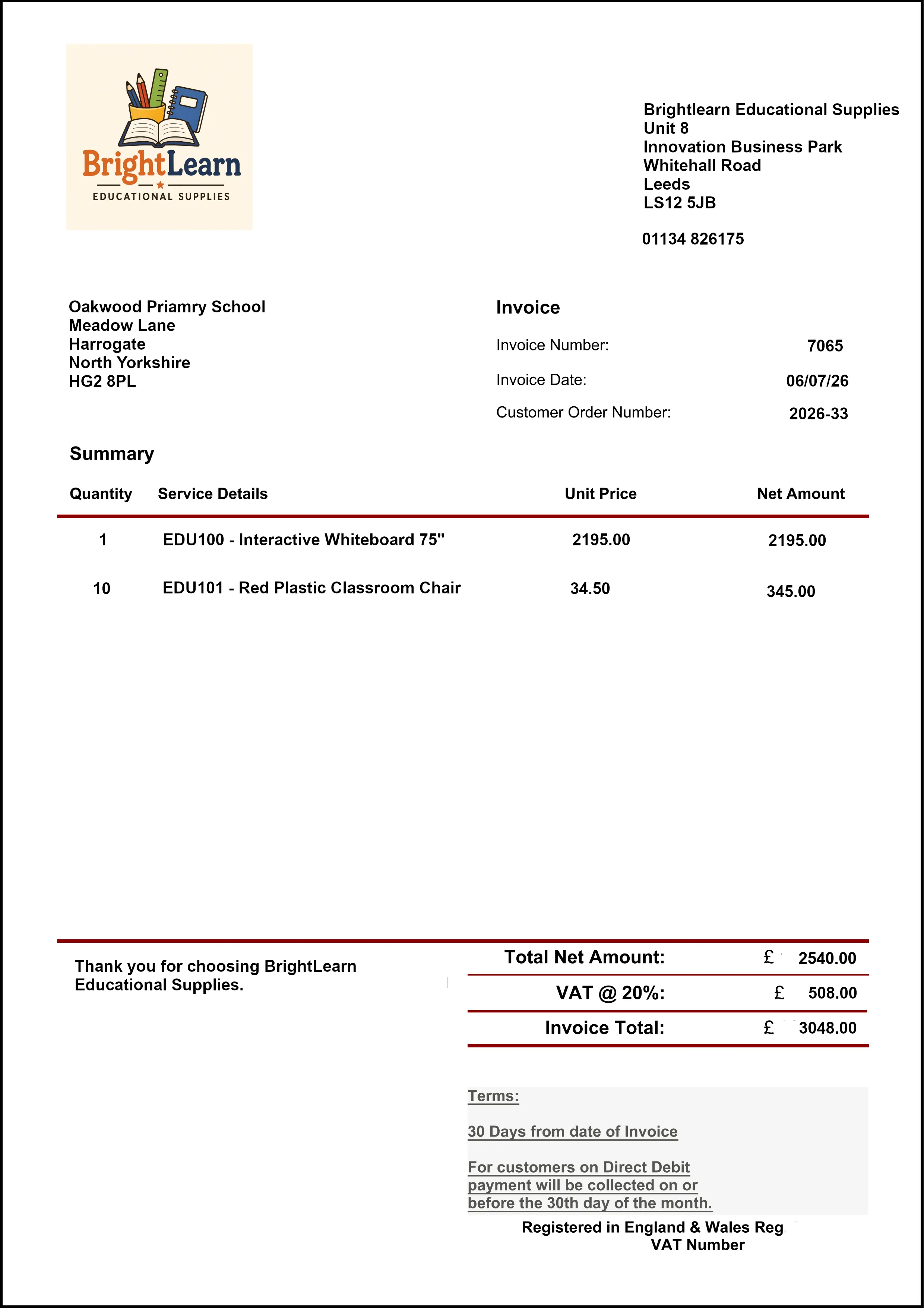
- Sent by the supplier after fulfilling the order and delivering to the relevant department or site.
- Contains all essential information including invoice number, line-item breakdowns, tax, payment terms, and delivery confirmation.
- Uploaded to Cloud B2B's system and automatically matched to the corresponding purchase order and goods receipt confirmation.
- Supports full three-way matching to ensure payment is only made for approved, delivered items.
- Integrates seamlessly with accounting platforms such as SAGE, XERO, and QuickBooks, reducing processing time and improving accuracy.
Invoices are critical in fast-paced educational environments, especially where multiple departments are placing regular orders for consumables, IT equipment, teaching aids, or facilities support.
Key Differences Between a Purchase Order and an Invoice in Education Procurement
- Timing: A purchase order is issued before any goods or services are supplied, acting as formal approval. An invoice is provided after fulfilment, requesting payment for what has been delivered.
- Purpose: A purchase order outlines what is being requested, by whom, at what cost and to where. The invoice confirms what was actually delivered and how much is owed.
- Process: Within Cloud B2B's system, each order passes through a tailored approval workflow. Once the goods are received, the system matches the invoice to the original order and delivery confirmation, ensuring the payment is accurate and verified.
How Purchase Orders and Invoices Work Together in the Education Sector
Cloud B2B's integrated platform ensures a secure, transparent and structured procurement to payment process:
By using Cloud B2B's fully integrated purchase order and invoice solution, schools, colleges, and universities gain full control over procurement activity, eliminating duplicate payments and ensuring every transaction is logged, compliant and easy to audit. The result is smarter purchasing, stronger financial oversight, and more efficient collaboration across departments.
How Can I Create an Education-Specific Purchase Order Document?
Creating a structured and accurate purchase order is a key step in managing procurement across the education
sector. Whether you're ordering science lab supplies for a secondary school, restocking catering consumables for a
college, purchasing IT equipment for university lecture halls, or sourcing classroom furniture for a new academic
year, a purchase order ensures that every request is clearly documented, properly authorised and aligned with
departmental budgets.
A purchase order is a formal, trackable request issued by a department to an approved supplier. It outlines
exactly what is needed, where it should be delivered, and under what terms. Cloud B2B's Purchase Order System for
Education makes this process straightforward and efficient for institutions managing multiple
departments,
campuses, or budget codes. It helps schools, academies and universities maintain financial control,
avoid
procurement delays and improve communication between departments and suppliers.
Steps to Create an Education Purchase Order Document Using Cloud B2B
By following these steps, education providers can create consistent, compliant, and department-specific purchase orders that align with financial controls and procurement policies. Whether you are managing procurement for a single campus or coordinating multiple departments across an academy trust or university network, Cloud B2B's Purchase Order System for Education helps you streamline purchasing and strengthen visibility across your organisation.
What Fields Should an Education Sector Purchase Order Template Include?
A well structured purchase order (PO) template is essential for accurate, compliant, and efficient procurement in
the education sector. Whether you're ordering library shelving for a secondary school, scheduling grounds
maintenance for a college, or procuring catering equipment for a university canteen, including the right fields
ensures clarity between departments and suppliers, accurate financial tracking, and full audit readiness.
Cloud B2B's education-specific purchase order system supports
the needs of schools, colleges, trusts, and
universities by offering configurable templates that reflect the unique structure of education institutions. This
ensures that every PO generated is complete, compliant, and fully aligned with internal budgets and approval
policies.
Essential Fields in an Education Purchase Order Template
Additional Features in Cloud B2B’s Education Purchase Order System
Departmental Level Budget Allocation:
Each line item can be assigned to a specific budget or cost centre, such as "SEND Department - Learning Support
Resources" or "PE - Equipment Replacement". This ensures that budget usage is tracked in real-time and that the
ordering department stays within it's allocation.
Goods Receipting Tools:
Staff can confirm full or partial receipt of goods directly in the system. Whether receiving cleaning stock at a
central stores area or AV equipment in a lecture theatre, Cloud B2B's digital tools allow for immediate updates
and accurate record keeping.
Supplier Price List Integration:
Product and service pricing can be managed centrally using importable templates. This is ideal for high-volume
education orders such as stationery packs, furniture, or catering stock. Where available, custom API integration
allows for live pricing feeds from preferred suppliers.
By using a standardised, clearly structured purchase order template within Cloud B2B's education-focused procurement system, institutions gain better financial control, improve communications with suppliers, while ensuring full transparency across every department and location. The result is fewer errors, improved compliance, and more efficient day-to-day operations across your trust, campus, or school.
How Can I Track the Status of Education Facility Purchase Orders?
Tracking the status of purchase orders is a crucial part of managing procurement within schools, colleges,
academies and universities. Whether you are ensuring that classroom supplies arrive ahead of the new term, that
catering stock reaches a college kitchen in time for lunch service, or that library resources are delivered for
the start of the academic year, having full visibility over every order helps keep operations running smoothly.
Cloud B2B's Purchase Order System for Educational
Organisations gives departmental staff, finance teams, and
central procurement managers complete, real-time visibility over every purchase order raised. Each PO can be
tracked from draft to delivery and invoicing, helping institutions reduce delays, improve supplier coordination
and maintain strong financial oversight across all departments and sites.
Methods for Tracking Education Purchase Orders
With Cloud B2B's education-focused purchase order system, institutions can track orders with clarity from start to finish. Whether managing teaching resources, IT upgrades or campus-wide services, the ability to monitor purchase orders in real-time supports smarter procurement, tighter financial control and better coordination between staff, finance, and suppliers.
How Can I Use Systems to Manage Approvals and Budget Controls for Education Purchase Orders?
For schools, colleges, academies, and universities, keeping tight control over procurement approvals and
departmental budgets is essential. Without a clear workflow, purchase orders can bypass checks, exceed budget
limits, or be delayed due to a lack of accountability. This can lead to overspending, poor audit outcomes, or
disruption to essential supplies and services.
Cloud B2B's Purchase Order System provides a simple,
structured solution that helps
education institutions manage
approvals, track spend by department or funding stream, and ensure every purchase is properly authorised. Whether
you are managing procurement for classroom materials, ICT equipment, site maintenance, or trust-wide initiatives,
the system ensures transparency and control at every step.
Key Features of Cloud B2B’s Approval and Budget Control System for the Education Sector
Approval Workflows by Site or Department
Set up flexible approval paths for departments such as ICT, Estates, Catering, SEND, or Classroom Resources.
Configure rules that reflect the internal structure of schools, colleges, academies, or university faculties.
Apply thresholds based on value or type of purchase. For example, day-to-day stationery may only require a
departmental lead, while capital projects might need approval from senior finance staff or governors.
Live Budget Monitoring
Allocate budgets to departments, curriculum areas, sites, or funding streams (e.g. "Year 11 Textbooks",
"Sports Facility Repairs", or "Pupil Premium").
Display remaining budgets in real-time during order creation.
Automatically prevent submission of purchase orders that exceed available budget limits unless escalated for
further approval.
Role-Based Access Controls
Assign permissions based on user roles so that only authorised staff can create, approve, or view purchase
orders.
Allow heads of department to manage subject-based orders, while trust-wide finance teams maintain full
visibility across sites.
Support audit compliance and help reduce unauthorised activity.
Complete Audit Trails
Track every action taken on a purchase order, including creation, edits, approvals, and rejections.
All activity is time and user stamped, helping schools, trusts, and institutions demonstrate compliance during
reviews or inspections.
Integration with Finance Systems
Seamlessly export approved orders and financial records into platforms such as SAGE, XERO, or QuickBooks.
Reduce manual entry and improve accuracy across procurement and finance workflows.

Custom Approval Rules by Campus or Funding Source
Tailor workflows to suit your operational model or funding conditions.
For example, trust-wide IT infrastructure upgrades may need strategic sign-off, while Department for
Education-funded purchases may follow stricter controls.
Automated Notifications & Alerts
Notify staff automatically when purchase orders require approval, have been modified, or need receipting.
Support timely reviews and help avoid processing delays at key points in the academic year.
Additional Features Tailored to Education Procurement
Custom Reporting and Analytics:
Generate detailed reports filtered by school, department, status, supplier, or term. Track spend patterns
across academic years, monitor supplier performance, and support audit preparation. Export reports in Excel,
CSV, or PDF for use in budget meetings, funding reviews, or governance reporting.
Goods Receipting:
Confirm partial, full, or bulk deliveries as soon as items arrive at the appropriate school or campus. For
example, a site manager receipting cleaning supplies, or a faculty administrator confirming delivery of
classroom display boards. Receipting updates the purchase order automatically and marks it as complete once
fully fulfilled.
By using Cloud B2B's Purchase Order System, education institutions gain full visibility and control over every stage of the procurement process. Whether you are ordering resources for a classroom, equipment for a college workshop, or services for a university-wide project, the system ensures every purchase is accountable, on budget, and approved by the right people.
How Does a Purchase Order System Support Multi-Academy Trusts, Local Authorities, and Institutions with Multiple Campuses or Departments?
In the education sector, managing procurement across multiple schools, faculties, or campuses can quickly become
complex. Multi-academy trusts, local authorities, and large colleges or universities often deal with diverse
department structures, varied supplier relationships and separate budget responsibilities at each site. Without a
unified system, this can lead to inconsistencies, overspending and limited visibility.
Cloud B2B's Purchase Order System for Education is designed
to simplify procurement for education institutions
operating across multiple locations. It provides a centralised, cloud-based platform that supports scalable
purchasing, robust budget control and clear accountability from classroom-level through to central finance teams.
Key Features Supporting Multi-Site and Multi-Department Education Organisations
Benefits for Education Institutions with Multiple Campuses or Departments

Consistent Procurement Across the Organisation

Scalable and Flexible Setup to Suit You

Enhanced Compliance and Control

Improved Visibility and Oversight
By implementing Cloud B2B's Purchase Order System, education institutions gain the tools to manage procurement effectively across every site and department. Whether you oversee a local authority schools network, a growing multi-academy trust, or a university with multiple faculties and campuses, the system delivers structure, visibility, and control. This ensures that purchasing remains consistent, accountable, and fully aligned with educational priorities.
How Can Purchase Order Analytics Improve Procurement Strategy Across Schools and Higher Education Institutions?
Effective procurement in the education sector goes beyond placing orders, it requires the intelligent use of data
to make strategic, budget-conscious decisions. With a wide range of departments and cost centres across schools,
colleges, and universities managing everything from classroom supplies to ICT upgrades, gaining visibility over
procurement activity is essential for improving value and reducing waste.
Cloud B2B's Purchase Order System for the Education industry
includes powerful reporting and analytics tools
tailored to the needs of educational institutions. These tools give trusts, school business managers, and finance
teams the insights they need to manage budgets, assess supplier performance, and align procurement with both
academic and operational goals.
Key Ways Purchase Order Analytics Improve Procurement In Education
Cloud B2B’s Analytical Features for Education

Customisable Dashboards
Tailor reporting views by school, department, supplier, or funding stream for quick access to the most relevant information.
Advanced Search & Export Tools
Filter by time period, PO status, spend level, or cost centre and export reports in CSV, Excel, or PDF.
Live Budget Tracking
Monitor spend against allocated budgets in real-time at department, site, or trust level.
Seamless Finance Integration
Connect with platforms such as SAGE, XERO, and QuickBooks to ensure consistent data between procurement and finance systems.
By using Cloud B2B's purchase order analytics, schools, colleges, and universities gain the data-driven visibility
needed to improve procurement strategy. Whether reviewing supplier performance, tracking budget usage, or planning
for the next academic year, institutions can reduce waste, improve efficiency, and ensure full compliance with
internal policies and external regulations.
How Do I Select the Best Cloud-Based Purchase Order System for My School, College, or University?
Selecting the right cloud-based purchase order system is an important step for any school, college, university or
multi-academy trust looking to modernise procurement, reduce manual administration and improve financial
visibility. Whether purchasing is managed at a single site or across multiple campuses, departments and budget
holders, the system should provide appropriate controls without adding unnecessary complexity.
Cloud B2B's offers two distinctPurchase Order System options
for the education sector. Organisations with straightforward requirements can choose our off-the-shelf package,
which provides established functionality for purchase orders, approvals, budgets, suppliers and reporting.
Institutions with more complex workflows, integrations or organisation-specific requirements can instead select
our separate customisable package.
Key Factors to Consider When Choosing a Purchase Order System for Education
Cloud B2B's Purchase Order System has been developed to
support the unique needs of
education institutions.
Whether you manage a single school or a growing trust, the system helps you standardise procurement, manage
budgets in real-time and ensure every order follows the correct approval path.
It offers a secure and scalable platform that helps reduce manual processes, maintain compliance, and give you
full control over your purchasing from request to reconciliation.
Final Summary: Why Cloud B2B is the Trusted Partner for Education Sector Procurement
Cloud B2B provides cloud-based purchase order software for schools, colleges, universities and multi-academy
trusts, helping education organisations improve purchasing control, budget visibility and procurement
consistency across departments, campuses and sites.
Our off-the-shelf Purchase Order System gives organisations a ready-to-use option with established
functionality for purchase orders, approvals, budgets, suppliers, goods receipting and reporting. For
institutions with more complex requirements, our separate customisable package allows workflows, integrations
and additional functionality to be developed around specific operational needs.
With more than a decade of experience delivering and supporting business systems, our UK-based team works closely
with education clients throughout implementation and beyond. Our in-house development approach also means both our
standard and customisable solutions are supported directly by the team responsible for the software.
Whether you are managing procurement within a single school or across a larger trust, college group or university,
Cloud B2B provides a secure and practical platform designed to reduce administration, strengthen financial control
and give authorised teams clearer visibility over purchasing activity.
Other References:
Construction Purchase Order Management
Sports & Leisure Purchase Order Management
Education Purchase Order Management
Purchase Order Management in Residential & Nursing Care
Purchase Order Management in Transport & Logistics
Purchase Order Management in Manufacturing